Viral Samples
Hosts Editor
Hosts Editor
Couldn't load pickup availability
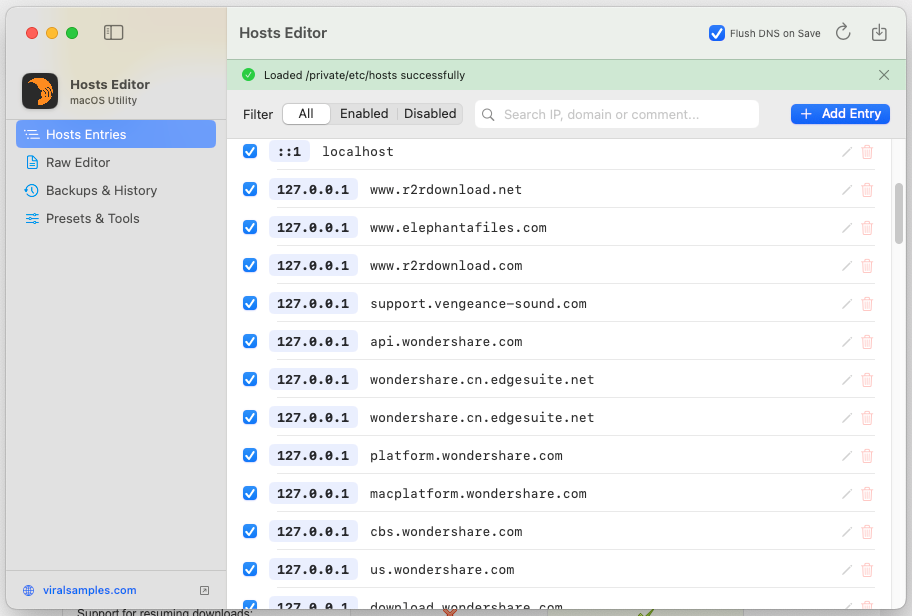
Hosts Editor is a native macOS application designed to easily view, edit,
back up, and restore your system's /private/etc/hosts file.
Built specifically for macOS using Swift and SwiftUI, Hosts Editor provides
a clean, intuitive user interface while handling system privilege escalation
and DNS cache management automatically.
KEY FEATURES
------------------------------------------------------------------------
1. VIEW & SEARCH HOSTS ENTRIES
- View all structured mappings in your /private/etc/hosts file.
- Filter entries by status: All, Enabled, or Disabled.
- Real-time search across IP addresses, domain names, and comments.
2. ADD, EDIT & DELETE MAPPINGS
- Easily add new IP-to-domain mappings.
- Quick IP presets (127.0.0.1, 0.0.0.0, ::1).
- Toggle entries on or off (comment/uncomment) with a single click
without losing comment data or formatting.
- Inline domain and comment editor with syntax validation.
3. STATE BACKUP & RESTORATION
- Automatic Pre-Save Backups: Keeps a snapshot of your hosts file before
every single save operation.
- Manual Snapshots: Create custom named backups anytime.
- 1-Click State Restoration: Preview any historical backup side-by-side
and restore your system hosts file with one click.
4. POWER USER RAW EDITOR
- Built-in monospace text editor for directly viewing and modifying raw
hosts file text.
- Auto-parsing and synchronization between raw text and visual controls.
5. PRESETS & UTILITIES
- Presets for local development environments (app.local, api.local).
- Flush macOS DNS Cache (mDNSResponder) with a single click so host changes
take effect immediately.
6. SECURE ELEVATED SAVING
- System hosts file updates are executed via native macOS privilege
authorization prompts (Touch ID / Admin Password).
INSTALLATION INSTRUCTIONS
------------------------------------------------------------------------
Option 1: Using the Installer (.pkg)
1. Double-click "Hosts Editor.pkg" to open the macOS Installer.
2. Follow the standard installation wizard.
3. Hosts Editor will be installed directly into your /Applications folder.
Option 2: Standalone Application (.app)
1. Drag "Hosts Editor.app" into your macOS Applications folder.
2. Double-click "Hosts Editor.app" to launch.
SYSTEM REQUIREMENTS
------------------------------------------------------------------------
- Operating System: macOS 13.0 (Ventura) or newer
- Architecture: Universal (Apple Silicon & Intel)
Share