Viral Samples
Codesigner v3.2 for Mac
Codesigner v3.2 for Mac
Couldn't load pickup availability
Codesigner v3.2 is a dedicated macOS application designed to repair, unlock,
and ad-hoc code-sign software packages, application bundles (.app), raw
binaries, dynamic libraries, and frameworks.
It resolves common macOS Gatekeeper restrictions, permission issues,
quarantine blocks, and missing/invalid signature errors (e.g., "App is
damaged and can't be opened" or "Developer cannot be verified").
KEY FEATURES & FUNCTIONALITIES
------------------------------
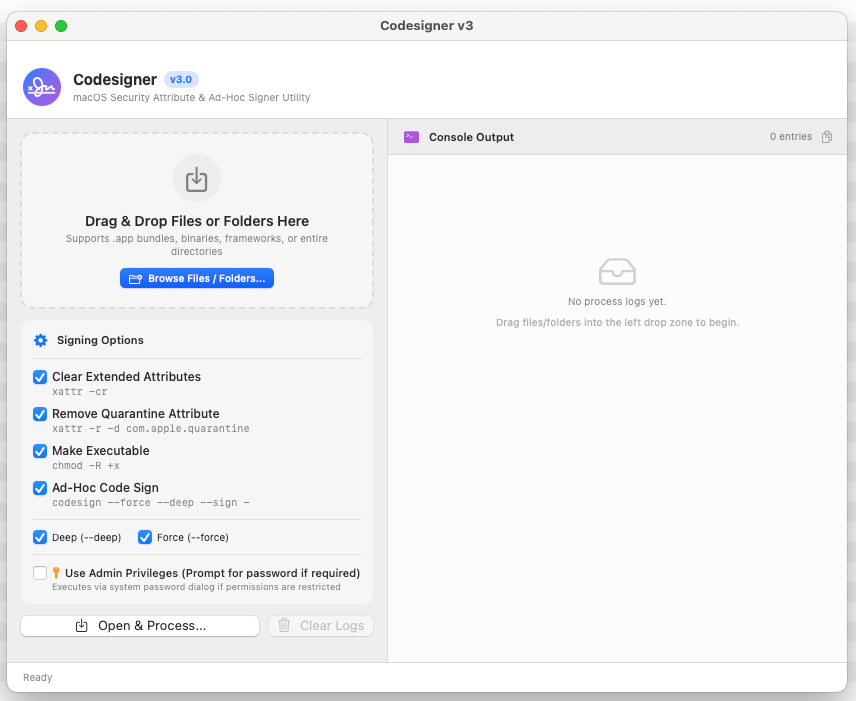
1. Interactive Drag & Drop Interface
- Drag & drop single or multiple .app bundles, executables, dynamic
libraries, or entire directories directly into the processing window.
- Built-in macOS native file browser dialog ("Browse Files / Folders...")
for quick manual selection.
2. Extended Attribute Cleaning (xattr -cr)
- Recursively clears all extended file attributes and metadata that may
cause code-signing validation failures or bundle corruption.
3. Gatekeeper Quarantine Removal (com.apple.quarantine)
- Strips the macOS quarantine attribute ('xattr -r -d com.apple.quarantine')
to allow unnotarized or manually downloaded applications to launch cleanly.
4. Executable Permission Repair (chmod -R +x)
- Ensures all binaries and scripts within app bundles or folders have the
proper executable (+x) permissions set.
5. Flexible Ad-Hoc Code Signing (codesign)
- Performs ad-hoc code signing ('codesign --sign -') without requiring an
Apple Developer account or certificate.
- Configurable Deep Signing (--deep) to sign embedded frameworks, helper
tools, and nested bundles.
- Configurable Force Signing (--force) to replace existing or broken
signatures.
6. Administrator Privilege Elevation
- Optional Admin Mode allows executing commands with elevated privileges
(prompts via standard macOS authentication dialog) when processing
system-protected directories or root-owned files.
7. Live Interactive Console Log
- Real-time logging of all terminal commands and operations performed.
- Color-coded log entries (Info, Success, Warning, Error) with timestamps.
- One-click "Copy Logs" button to quickly export diagnostic output to
clipboard.
- Real-time batch statistics (Total Processed, Succeeded, Failed).
8. Native macOS Experience
- Built with SwiftUI & AppKit using translucent Visual Effect backdrops.
- Supports Dark Mode & Light Mode seamlessly.
- Automatic proportional window scaling and layout adjustment.
NEW FEATURES & ENHANCEMENTS in v3.2 :
1. Directory Structure Creation Option (sudo mkdir -p)
- Added toggle option to automatically create and ensure parent directory
structures exist before performing code signing or permission fixes.
2. Full Permission Grant Option (sudo chmod -R 777)
- Added toggle option to recursively set 777 (read/write/execute for all)
permissions on target folders, binaries, and app bundles.
SYSTEM REQUIREMENTS
-------------------
- macOS 13.0 (Ventura) or later
- Apple Silicon (arm64) or Intel Mac
INSTALLATION
------------
Double-click "Codesigner v3.2.pkg" to launch the standard macOS Installer.
The package will install "Codesigner v3.2.app" into your /Applications directory.
USAGE INSTRUCTIONS
------------------
1. Launch "Codesigner v3.2" from /Applications.
2. Select your desired signing options in the left control panel:
- Clear Extended Attributes
- Remove Quarantine Attribute
- Make Executable
- Ad-Hoc Code Sign (Deep & Force options)
- Use Admin Privileges (if modifying system-protected binaries)
3. Drag & drop target files or app bundles onto the drop zone, or click
"Browse Files / Folders...".
4. Monitor progress and execution details in the real-time Console Output panel.
Share